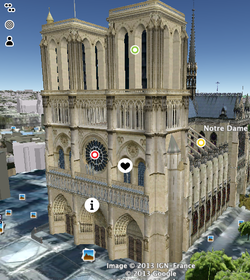
Student created 20 mins after post
I have known about Thinglink.com for at least a year. But it has been blocked at school and I never really saw a need to push the issue. However, yesterday I was thinking about a mini lesson that I do on Middle Ages art for our Middle Ages Quest (see it here) and realized that several kids will be out when I begin that lesson next week. As I was wondering how to handle that, Thinglink came to mind. I had seen it but never used it. I emailed the District Office and they opened Thinglink.com in about 20 minutes. So, today I spent about an hour making the two below. I do think I will get better and faster at it, but I also have a feeling that I will not need to do many more, as the students will take over.
I posted a short blog on my school website about Thinglink, and within 40 minutes a student showed me the one above. He had used google earth (which I used with them yesterday to tag different Cathedrals all around Europe for the quest) and he made one for his blog post as a Knight. He is writing his blog about taking a pilgrimage to a Cathedral in first person. If he built one based on a post without any pushing...most students will love using it and all I have to do is show them how and pick out the best. They rock!
A few things to remember:
-Free
-Easy to upload any photo or use flickr photo's
-In edit just click and add text, links, images, podcasts and even youtube's directly in the image
Thinglink.com is fun and a great way to bring images to life. Not to mention a great teaching tool for our visual students. If you make one, leave a comment and a link to your Thinglink.
Cheers, Garth
I posted a short blog on my school website about Thinglink, and within 40 minutes a student showed me the one above. He had used google earth (which I used with them yesterday to tag different Cathedrals all around Europe for the quest) and he made one for his blog post as a Knight. He is writing his blog about taking a pilgrimage to a Cathedral in first person. If he built one based on a post without any pushing...most students will love using it and all I have to do is show them how and pick out the best. They rock!
A few things to remember:
-Free
-Easy to upload any photo or use flickr photo's
-In edit just click and add text, links, images, podcasts and even youtube's directly in the image
Thinglink.com is fun and a great way to bring images to life. Not to mention a great teaching tool for our visual students. If you make one, leave a comment and a link to your Thinglink.
Cheers, Garth
Click all the buttons for a feel of what you can do.


 RSS Feed