The Partnership for 21st Century skills outlines what it believes to be 21st Century skills today's schools need to be teaching. Ohio became part of this partnership in 2009. The partnership talks about the traditional three R’s and the four C’s. The four C’s include the following:
1. Critical thinking and problem solving
2. Communication,
3. Collaboration
4. Creativity and innovation
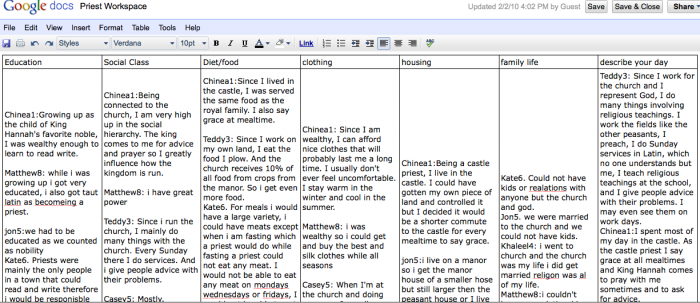
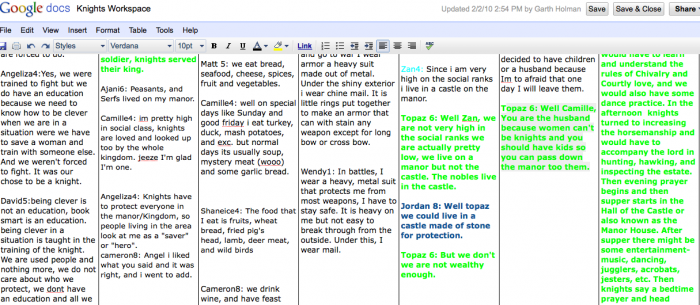
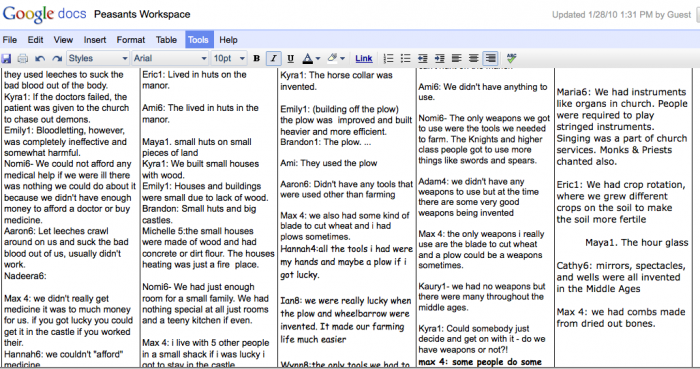
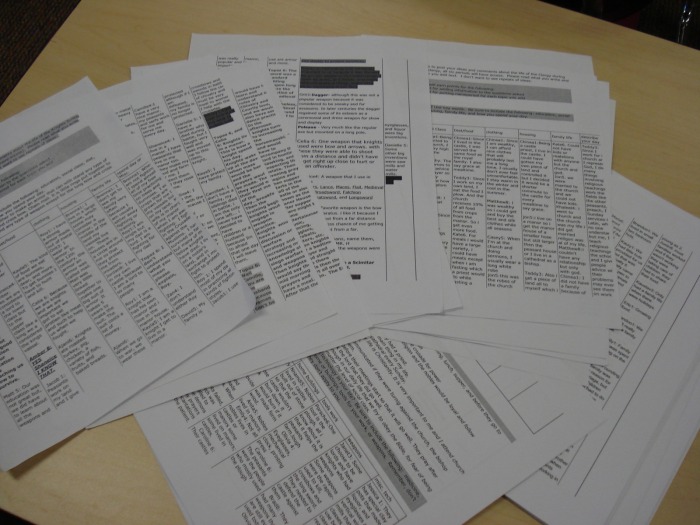
I would like to address the collaboration idea in this post. For the last three weeks my students have been learning about the middle ages. They learned the basics from a webquest, while viewing their learning from the perspective of one member of the social hierarchy during the middle ages. While this webquest allowed student to explore different parts to the middle ages they did not have a great way to share what they were learning. I wanted them to blog, but blogs were not “opened” for the students on our network. So, I thought about what I could use. I have used google docs for online testing (Read Mike’s Post on google doc testing), surveys and collaboration with other teachers, so I created workspaces for each group in the social hierarchy. Students were able to share what they had learned with the kings, nobles, knights, clergy, or peasants from other classes in the middle school. Students had found had ideas, facts, stories that no one else had found and with google docs collaboration with ever seventh grader in the school was possible and LIVE. The images below give you an idea of what the final product looked like. I did print out the documents and ended up with 51 pages of information. I must say, almost all of it was good information…only one OMG, not bad for 109 12 year olds.
Let my students tell you what they thought. These are comments from their journals:
Connor: I liked google docs because I got to learn new things and I was able to respond to questions my self or add on to other comments. The thing about google docs is you can openly discuss what interesting facts you know and its is very close to a silent classroom with no side conversations. I liked how in google docs you could see what other people have written and branch off from that as opposed to a classroom where you could forget what that person said or what you were about to say.
Nadeera: Yes I did like the Google Docs because it was sort of like blogging. We got to type about how we felt as a certain persons perspective. It was fun to me and I learned a lot.
Caroline: Yes, I enjoyed the program because it gave us a chance to understand what other kids think about the same situation. It gave me new ideas and view points on the same topic and so many different thoughts about things I didn’t even learn yet. I learned the opinions of other kids and new view points on different topics.
Orit: I liked working with google docs because a lot of people write what they know and then they can share it with others. From Google docs you can share ideas and stories that people didn’t know before and new things. In the middle ages I learned about a lot about knights, like what is a page and what is a squire. The middle ages was very interesting to learn about. I think that Google docs helped me to learn lots of different things.
Kate: I liked google docs. I thought it was so cool how we could share thoughts without even talking to one another or seeing each other during the day, it helped share Ideas if one person found an interesting fact but no one else did they could share that easily. I also found myself going on google docs once or twice at home and checking to see what others had added. You could use google docs for pretty much anything if you were doing, a project it would be great. I hope we do another project where we use google docs, I liked how you could correct someone else too. I learned that priests helped out with medicine and I did not know that before, I also learned what they ate if they lived on a manor instead of a castle.
Kids enjoyed the process, they learned from others and they “went home and looked”. Those are good things. By using google doc workspaces for students we create a free open place for them to learn a 21st century skill: collaboration.
A few questions to think about:
1. How could you use this in your classroom?
2. How does this type of collaboration change teaching and learning?
1. Critical thinking and problem solving
2. Communication,
3. Collaboration
4. Creativity and innovation
I would like to address the collaboration idea in this post. For the last three weeks my students have been learning about the middle ages. They learned the basics from a webquest, while viewing their learning from the perspective of one member of the social hierarchy during the middle ages. While this webquest allowed student to explore different parts to the middle ages they did not have a great way to share what they were learning. I wanted them to blog, but blogs were not “opened” for the students on our network. So, I thought about what I could use. I have used google docs for online testing (Read Mike’s Post on google doc testing), surveys and collaboration with other teachers, so I created workspaces for each group in the social hierarchy. Students were able to share what they had learned with the kings, nobles, knights, clergy, or peasants from other classes in the middle school. Students had found had ideas, facts, stories that no one else had found and with google docs collaboration with ever seventh grader in the school was possible and LIVE. The images below give you an idea of what the final product looked like. I did print out the documents and ended up with 51 pages of information. I must say, almost all of it was good information…only one OMG, not bad for 109 12 year olds.
Let my students tell you what they thought. These are comments from their journals:
Connor: I liked google docs because I got to learn new things and I was able to respond to questions my self or add on to other comments. The thing about google docs is you can openly discuss what interesting facts you know and its is very close to a silent classroom with no side conversations. I liked how in google docs you could see what other people have written and branch off from that as opposed to a classroom where you could forget what that person said or what you were about to say.
Nadeera: Yes I did like the Google Docs because it was sort of like blogging. We got to type about how we felt as a certain persons perspective. It was fun to me and I learned a lot.
Caroline: Yes, I enjoyed the program because it gave us a chance to understand what other kids think about the same situation. It gave me new ideas and view points on the same topic and so many different thoughts about things I didn’t even learn yet. I learned the opinions of other kids and new view points on different topics.
Orit: I liked working with google docs because a lot of people write what they know and then they can share it with others. From Google docs you can share ideas and stories that people didn’t know before and new things. In the middle ages I learned about a lot about knights, like what is a page and what is a squire. The middle ages was very interesting to learn about. I think that Google docs helped me to learn lots of different things.
Kate: I liked google docs. I thought it was so cool how we could share thoughts without even talking to one another or seeing each other during the day, it helped share Ideas if one person found an interesting fact but no one else did they could share that easily. I also found myself going on google docs once or twice at home and checking to see what others had added. You could use google docs for pretty much anything if you were doing, a project it would be great. I hope we do another project where we use google docs, I liked how you could correct someone else too. I learned that priests helped out with medicine and I did not know that before, I also learned what they ate if they lived on a manor instead of a castle.
Kids enjoyed the process, they learned from others and they “went home and looked”. Those are good things. By using google doc workspaces for students we create a free open place for them to learn a 21st century skill: collaboration.
A few questions to think about:
1. How could you use this in your classroom?
2. How does this type of collaboration change teaching and learning?
 RSS Feed